Fake window projector: how to make a virtual window with a projector
Turn a windowless wall into a window view with a projector: what you need, how to make it look real, where to get window videos, and step-by-step setup.

A fake window is a window view projected onto a wall: a mountain village, a beach at sunset or a rainy city street, framed so it reads as a real window. It's an inexpensive way to make a basement, a windowless office or a kids' room feel bigger, and with a projector you can make it any size and change the view whenever you like.
This guide covers what you need, how to make the illusion convincing, where to get window videos you're allowed to use, and how to set it up from your phone with Lazy Lighting, which includes four window scenes. Disclosure: we make Lazy Lighting.

Map it from your phone
Lazy Lighting turns your phone into a projection mapping tool for any projector, on iPhone, iPad and Android.
Free to download · optional Pro
Can a projector make a fake window?
Yes. Point a projector at a blank wall, play a video of a window view, and keep everything outside the window shape black, so only the "window" lights up. In a dim room it looks surprisingly real.
The catch is light. A projector can't compete with daylight, so a projected window works best in rooms you use with the lights low or in the evening.
Projector, TV or LED panel: which is best for a fake window?
If the room is used in daylight and needs to stay bright, a TV in a frame is the practical choice. For a basement, a game room or a bedroom used in the evening, a projector gives you a bigger, more flexible window for less money.
| Option | Good at | Watch out for |
|---|---|---|
| Projector | Any size and any shape, low cost per inch, no screen edge, easy to change the view | Needs a dim room; anything in front of the wall casts a shadow; fan noise |
| TV or monitor inside a window frame | Bright enough for daytime, sharp picture | Fixed size, visible bezel, cost climbs quickly with size |
| Dedicated LED fake-window or skylight panel | Convincing daylight glow | Expensive and tied to one look |
What do you need for a fake window projector?
- A projector. Any projector with an HDMI input works. For a window-sized picture in a dim room, roughly 500 to 1,000 ANSI lumens is comfortable; with lamps on, aim for 2,000 or more. A short-throw projector can sit close to the wall, so nobody walks through the beam.
- A phone or tablet. An iPhone, iPad or Android device with Lazy Lighting to shape the window and play the scene. There's no Mac or Windows version.
- A connection. A USB-C or Lightning to HDMI adapter is the most reliable. Wireless works too: AirPlay from iPhone or iPad, screen mirroring on Android phones that support it, or Lazy Lighting Link on an Android TV or Google TV projector, or on a Chromecast with Google TV.
- A wall. Smooth, light-colored and matte. Textured or dark paint shows through the picture.
- Optional extras. Window trim or a frame, a narrow shelf as a sill, and a pair of curtains.
How do you make a fake window look real?
- Size it like a real window. About 3 by 4 feet (90 by 120 cm), with the sill around desk height. A view that fills the whole wall reads as a screen, not a window.
- Frame it. Trim, picture-frame molding or a salvaged window frame around the picture hides its edge and sells the illusion. Lazy Lighting's window scenes include their own frame and sill, so they look like a window on a plain wall even without carpentry.
- Keep the rest of the wall dark. Map one shape to the window area so everything around it projects black. A faint gray rectangle of light around the window gives it away.
- Add curtains. Curtains on each side cover the soft edges of the picture and make the window feel lived in.
- Match the room's light. A night scene suits dim, warm lamps. A sunny scene looks best with the room lights low but not off. Keep lamps from shining on that wall.
- Choose slow scenes. Gentle motion like falling snow, waves or rain on the glass looks natural. Fast cuts break the illusion.
- Hide the projector. Put it on a high shelf or a ceiling mount so the beam passes over people, then map the window after it's fixed in place.
Map it from your phone
Lazy Lighting turns your phone into a projection mapping tool for any projector, on iPhone, iPad and Android.
Free to download · optional Pro
Where can you get window view videos?
Use videos you have the right to show:
- Built-in scenes: Lazy Lighting includes four window views, listed below.
- Your own footage: film the view from a real window with your phone on a tripod. A minute or two of steady footage loops well.
- Royalty-free stock sites: sites such as Pixabay and Pexels offer free videos. Check the license on each clip.
- Paid stock footage: for a specific view, like a particular city or a ski lodge, stock libraries sell clips for personal use.
Which window scenes does Lazy Lighting include?
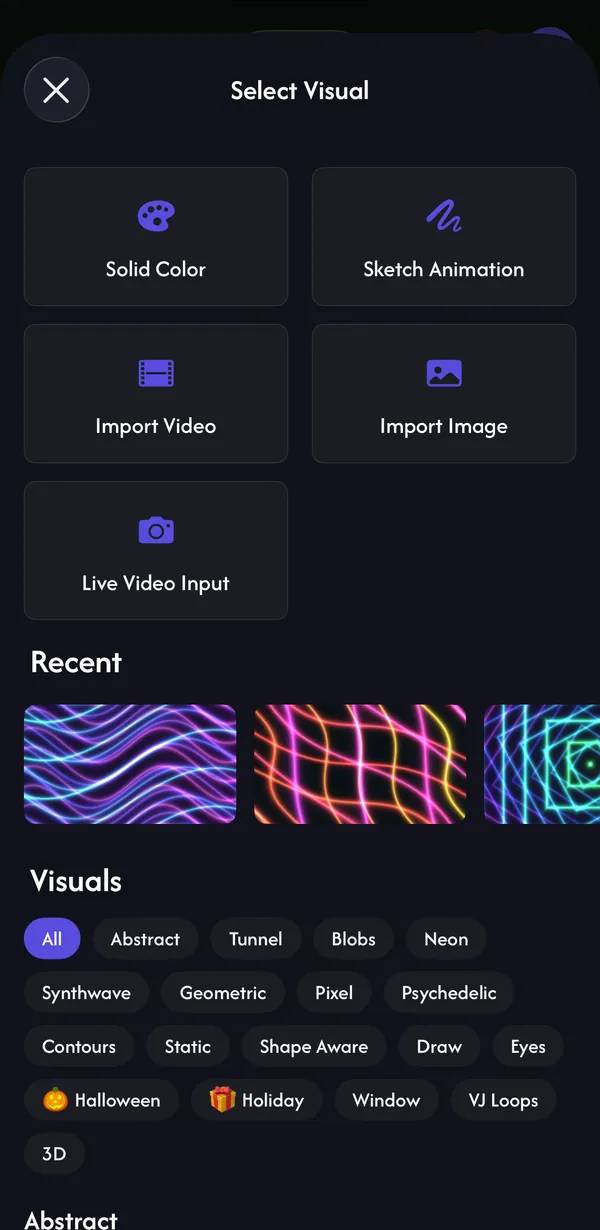
Four looping window views, each with its own frame and sill, in the Window category when you pick a visual:
- Snowy castle at night (free): a moonlit valley and castle seen through gothic stone arches, with snow falling.
- Alpine valley (Pro): a sunny mountain village through a wooden window.
- Beach sunset (Pro): waves rolling in at sunset through tall window panes.
- Rainy city at night (Pro): rain on the glass over a quiet city street.
How do you set up a fake window with Lazy Lighting?
- 1
Fix the projector where it will stay, point it at the wall and focus it. Turn its keystone and auto keystone off.
- 2
Connect your phone to the projector by cable, AirPlay, screen mirroring or Lazy Lighting Link.
- 3
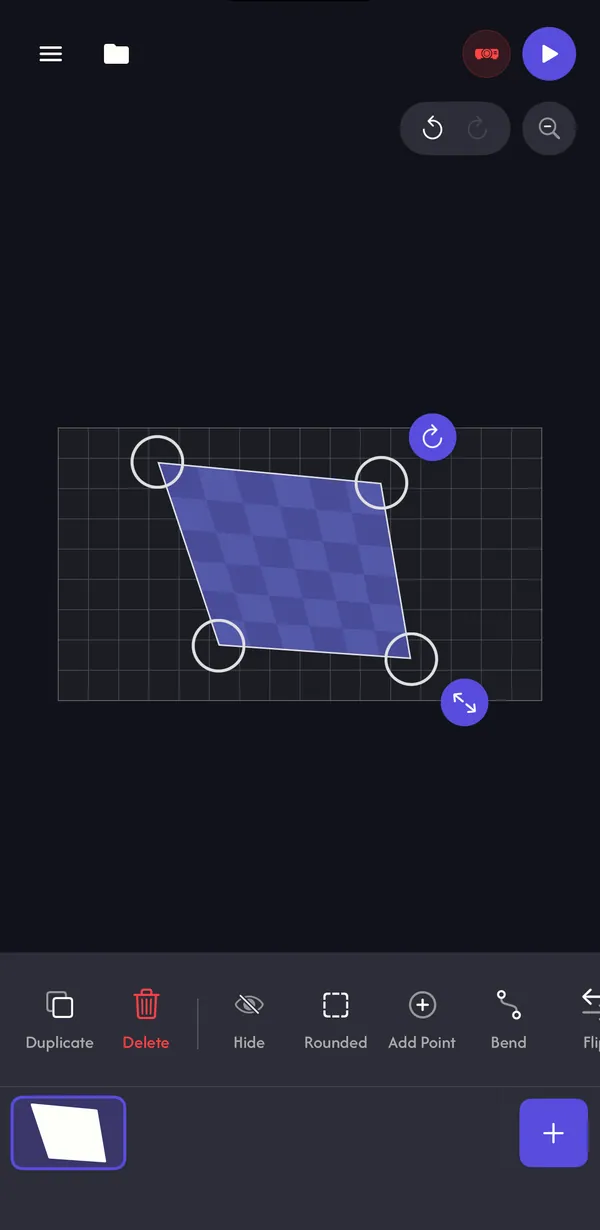
In Mapping, add a Square and drag its four corners to the window area on the wall, or to the inside of your frame. For an arched window, use Outline and trace the shape; for a porthole, use a Circle.
- 4
In Play, select the shape, open the visual picker and choose a scene from the Window category, or import your own video.
- 5
Dim the room and nudge the corners until the edges sit exactly on the frame.
- 6
With Pro, save the project so the window comes back next time. To keep it running without your phone, use Link Playback on an Android TV or Google TV projector, or export the window as a video, copy it to a USB drive and play it from the projector.
Fake window ideas
- Basement or windowless room: a sunny alpine valley or a beach sunset makes a low room feel more open.
- Home office: a rainy city at night for evening work.
- Kids' room: the snowy castle as a bedtime window, with the projector turned down.
- Christmas: → a snowy window above the fireplace or in a hallway, next to gift boxes mapped with moving wrapping paper.
- Game or movie room: a window view between screens for atmosphere before the movie starts.
Frequently asked questions
- What is a fake window projector? A projector showing a window-view video on a wall, framed or masked so it looks like a real window. It's used to brighten basements, windowless offices and bedrooms.
- How bright does a projector need to be for a fake window? About 500 to 1,000 ANSI lumens in a dim room, and 2,000 or more with lamps on. Daylight washes out any projector, so a TV in a frame suits rooms used in the daytime.
- Where do I get fake window videos? Use built-in scenes like Lazy Lighting's, film your own view, or use royalty-free or paid stock footage with a license that allows it. Don't project other people's YouTube videos.
- Does Lazy Lighting have window scenes? Yes, four: a snowy castle at night (free), plus an alpine valley, a beach sunset and a rainy city at night with Pro. You can also import your own videos.
- Can I make an arched or round fake window? Yes. In Lazy Lighting, trace an arch with the Outline shape or use a Circle for a porthole. Everything outside the shape stays black.
- Can I use a TV instead of a projector? Yes, and in a bright room a TV inside a window frame is the better choice. A projector wins on size, flexibility and cost in dim rooms.
- Will the window come back after I turn everything off? With Pro you can save the project and reload it. If the projector moved, nudge the corners back into place.