Descargar

Escanea con tu teléfono para instalar

Christmas projector guide · 2026

Christmas projection mapping from your phone

Christmas projection mapping turns one projector into a display that fits your house: snow falling inside each window, a light tree on the garage door, every panel of the house front playing its own scene. A laser or snowflake light projector sprays the same pattern over everything; a mapped display follows the shapes of your windows and doors, and you can set it all up from your phone.

Free to download · optional Pro

By Jake Silverstein ·

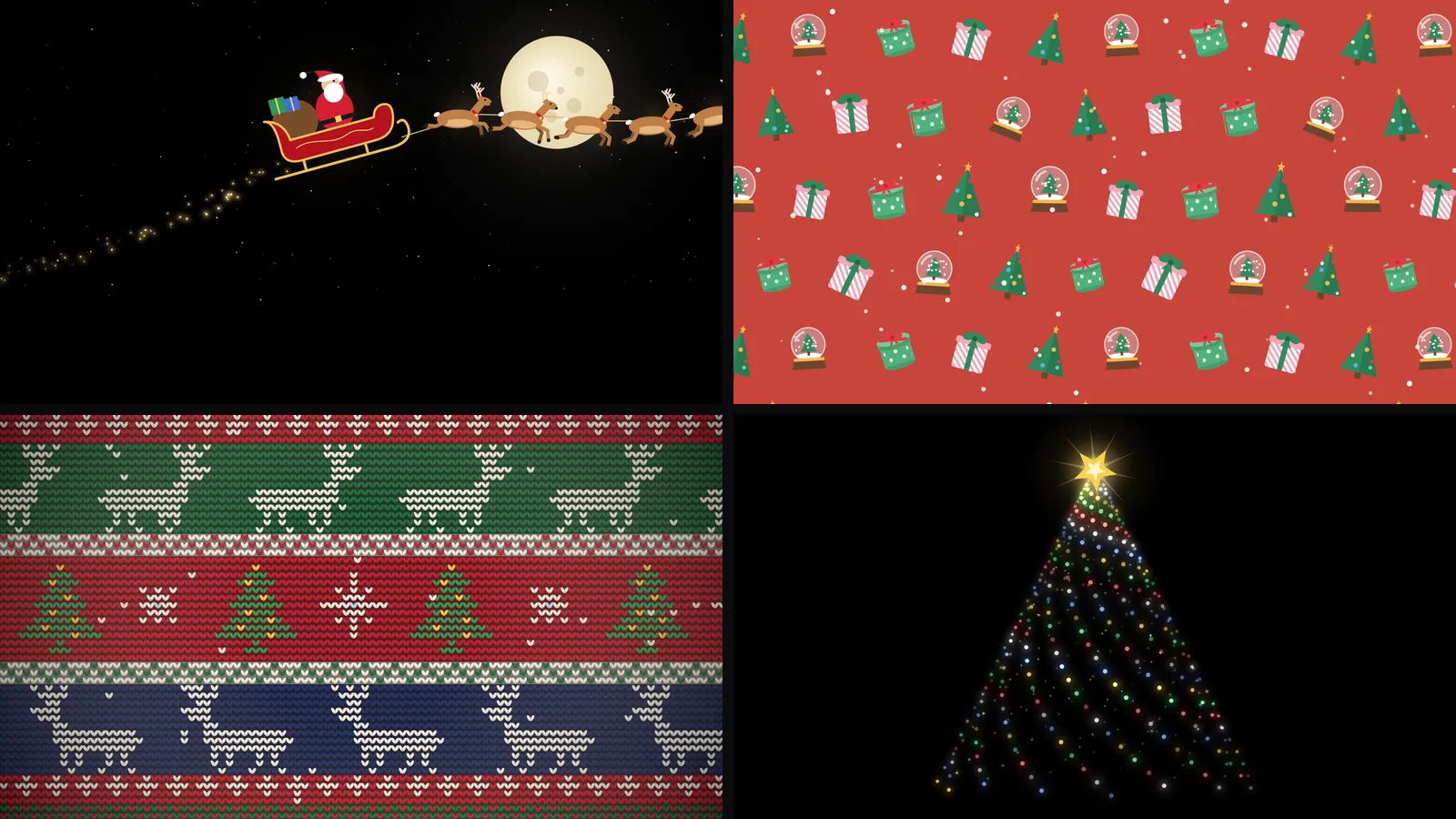
Four of Lazy Lighting's built-in Christmas scenes: Santa's sleigh crossing a full moon, a red wrapping-paper pattern of gifts, trees and snow globes, a knitted reindeer sweater pattern and a spiral light tree
Four of the 30 built-in Christmas scenes, as they play in the app.

One of the built-in scenes: Santa's sleigh

This is Santa's sleigh as it plays in Lazy Lighting: a sleigh and reindeer crossing a moonlit sky on a black background. It is one of the 30 Christmas scenes included with Pro.

Scenes on black work especially well on windows and house fronts. Black areas project almost no light, so the sleigh seems to fly across the glass or the wall instead of sitting in a glowing rectangle.

What Lazy Lighting does for Christmas

  • Runs on iPhone, iPad and Android phones and tablets, with no laptop or desktop software.
  • Comes with 30 Christmas scenes: falling snow, Santa's sleigh, a twinkling light tree, a gingerbread parade, knitted-sweater patterns and wrapping-paper patterns of gifts, ornaments, bells and candy canes.
  • Fits each scene to the shape of a window, a door or a section of the house, not just a rectangle, and each shape plays its own scene.
  • Plays your own videos and photos too, including Christmas videos you have already bought.
  • Loops scenes until you stop them, so the display runs all evening.
  • With Pro, audio-reactive visuals move to the Christmas music you play.

Four ways to set up a Christmas projector

Pick the one that fits your house. The first two work indoors with a small projector; the last two are outdoor displays that need a much brighter one.

01 · Indoors, seen from outside

Snow and Santa in the window

Project from inside, seen from the street

Hang a white sheet, shower curtain or sheer white fabric tight across the inside of the window and project onto it from the room. People outside see falling snow, Santa's sleigh or a gingerbread parade in the window while the room behind stays hidden.

Map a shape to the window so the scene stays inside the frame; for an arched or odd-shaped window, trace it with an Outline shape. Keep the room dark, because any light behind the fabric washes out the image. A small projector is enough: 300 ANSI lumens after dark, or 1,000+ on a bright street or at dusk.

02 · Indoors

Fireplace, wall or a projected tree

A cosy display inside the house

Aim the projector at the chimney breast above the fireplace, a plain wall or the wall behind the tree, and darken the room. Add a shape for each area and give each its own scene: falling snow above the mantel, a knitted-sweater pattern on the chimney breast, or a Text shape that spells out Merry Christmas.

No room for a real tree? Map a tall shape to a door or a narrow strip of wall and play the twinkling light-tree scene. Projecting onto a real tree rarely reads well, because the dark needles swallow the light, so use the wall behind it instead.

A small projector handles a mantel or a patch of wall in a dark room. To fill a whole living-room wall, look for 500–1,000 ANSI lumens.

03 · Outdoors

Garage door

One big surface, projected from the driveway

Set the projector on a tripod in the yard or driveway and aim it at the garage door. Map one shape to the door and fill it with a big, slow scene: the light tree, falling snow or Santa's sleigh read well from across the street, where fast patterns turn to mush.

A garage door needs 3,000+ ANSI lumens after dark, roughly ten times what a window needs. The small projector we use indoors looks faint out here; our outdoor pick is the XGIMI Horizon 20 Pro.

04 · Outdoors

The whole house front

Every window, door and panel mapped on its own

This is where projection mapping leaves a light projector behind. Map each window, the front door and the wall panels as separate shapes and give each its own scene: snow in the windows, a sweater pattern on the door, gift patterns on the panels. The house looks decorated instead of wearing a rectangle of video.

Set up the projector across the yard or the street, draw a shape over each surface on your phone and drag the corners until they line up. Most house fronts take under 30 minutes.

This needs 4,000–5,000+ ANSI lumens. The XGIMI Horizon 20 Pro (4,100 ISO lumens) fills up to about 6.6 metres (22 feet) of width from around 8 metres (26 feet) back, enough for a garage and the windows around it. On a larger house, map the section people see from the street.

Which projector do you need?

It comes down to inside or outside. A window needs about 300 ANSI lumens after dark; a garage door needs 3,000 or more, and a whole house front 4,000 to 5,000 or more.

Indoors: windows, mantels and small walls

Nebula Capsule 3 Laser

The projector we use in our videos. At 300 ANSI lumens it is bright enough for a window seen from the street after dark, or a mantel in a dark room. Small and battery powered, with Google TV built in for wireless Lazy Lighting Link and a standard tripod thread.

View on Amazon ↗

Outdoors: garage doors and house fronts

XGIMI Horizon 20 Pro

Bright enough for outdoor displays after dark (4,100 ISO lumens), with Google TV built in. Its image tops out at about 6.6 m (22 ft) wide, so on a big house map the street-facing section. It runs on mains power, so plan an outdoor-rated extension cord.

View on Amazon ↗

Whichever you choose, put it on a tripod ↗ so the mapping stays lined up all season.

As an Amazon Associate we earn from qualifying purchases.

How to set it up in 5 steps

  1. 1

    Get Lazy Lighting. Download it from the App Store for iPhone and iPad, or Google Play for Android phones and tablets.

  2. 2

    Connect your phone to the projector. A USB-C or Lightning to HDMI cable is the most reliable. iPhone and iPad can also use AirPlay, Android phones can use screen mirroring where the phone supports it, and Android TV or Google TV projectors connect wirelessly with Lazy Lighting Link.

  3. 3

    Draw a shape on each surface. Add a Square, Circle, Outline or Text shape for each window, door or panel and drag its corners on your phone while you watch the projection line up. For an arched window, trace it with an Outline shape.

  4. 4

    Pick a Christmas scene. Choose one of the 30 built-in Christmas scenes for each shape, or import your own videos and photos.

  5. 5

    Lock it down and leave it running. Sandbag the tripod so nothing shifts, keep the phone plugged in, and on iPhone set Auto-Lock to Never so the phone doesn't sleep.

Connection guide: cables, AirPlay and Lazy Lighting Link →

Christmas light projector or projection mapping?

Laser and snowflake light projectors are cheap and simple: plug one in, point it at the house and it sprays moving dots or snowflakes over whatever is in front of it. That is also their limit. They can't fit a window, frame a door or follow the outline of the house, and they can't play a scene like Santa's sleigh.

Projection mapping uses a video projector instead. You draw a shape over each surface, and each shape plays its own animated scene, so the display fits the house rather than covering it. If you would rather run a large show from a computer, see our comparison of projection mapping software.

FunciónLaser or snowflake light projectorVideo loop on a USB stickLazy Lighting on your phone
Fits windows, doors and the outline of the houseNo, it covers everything in its beamNo, it plays a rectangleYes
Animated scenesNo, moving dots or snowflakesYes, one video at a timeYes, a different scene on each shape
Christmas contentBuilt-in patterns onlyBuy or download loops30 scenes built in, plus your own videos
Best forQuick sparkle over a big areaOne flat surfaceWindows, garage doors and house fronts
Projection mapping software compared →

Christmas projector videos: built in, bought or your own

Lazy Lighting's 30 Christmas scenes cover falling snow, Santa's sleigh, a twinkling light tree, a gingerbread parade, candy-cane stripes, knitted Christmas-sweater patterns with reindeer, snowmen, penguins and Santa, and wrapping-paper patterns of gifts, ornaments, bells, wreaths and snowflakes. Four of them are on the free plan; Pro unlocks the rest.

If you have bought Christmas window videos elsewhere, for example from AtmosFX, import the file and map it like a built-in scene. Your own videos and photos work the same way.

How bright does the projector need to be?

Brightness is the one thing you can't fix in the app. Rough guide, after dark:

SurfaceANSI lumens
Window, projected from inside onto fabric300+ (1,000+ on a bright street or at dusk)
Indoor wall in a dim room500–1,000
Garage door3,000+
Whole house front4,000–5,000+

Running a display outside

  • Keep the projector dry and warm enough. Rain and cold are the main risks. Set it under a covered porch or in a weatherproof enclosure rather than out in the open.
  • Use outdoor-rated extension cords. Indoor cords aren't made for wet ground or freezing nights.
  • Think about the neighbours. Keep the light off their windows and out of drivers' eyes, and switch the display off at a reasonable hour.

Common questions about Christmas projectors

How do I project Christmas lights onto my house?

Put a bright projector (4,000+ ANSI lumens) on a tripod across the yard, connect your phone, and draw a shape over each window, door and panel in Lazy Lighting. Give each shape a Christmas scene and leave it running. Most house fronts take under 30 minutes to map.

What's the difference between a Christmas light projector and projection mapping?

A laser or snowflake light projector throws the same pattern of dots or snowflakes over everything in front of it. Projection mapping uses a video projector and fits a separate animated scene to each window, door or section of the house, so the display follows the shape of the building.

What projector do I need for a Christmas display?

For a window, about 300 ANSI lumens after dark is enough; we use the Nebula Capsule 3 Laser. A garage door needs 3,000+ and a house front 4,000–5,000+; our outdoor pick is the XGIMI Horizon 20 Pro, which fills up to about 6.6 m (22 ft) wide. Any projector with an HDMI input works with a cable.

Is Lazy Lighting free?

Lazy Lighting is free to download. The free plan lets you map surfaces and use about 20 visuals, including four of the Christmas scenes, with a small watermark on the projector output. Pro unlocks all 30 Christmas scenes, all 45 Halloween scenes and every other visual, and adds audio-reactive visuals, BPM sync, MIDI, video export up to 4K and project saving, with no watermark. Monthly, annual and lifetime plans are available.

Which Christmas scenes are included?

30 Christmas scenes: falling snow, Santa's sleigh, a twinkling light tree, a gingerbread parade, candy-cane stripes, knitted Christmas-sweater patterns and wrapping-paper patterns of gifts, ornaments, bells and snowflakes. You can also import your own videos and photos.

How do I connect my phone to the projector?

Use a USB-C or Lightning to HDMI cable, AirPlay from iPhone or iPad, screen mirroring on Android phones that support it, or Lazy Lighting Link on Android TV and Google TV projectors for a wireless connection. Chromecast isn't supported, and there is no Mac or Windows version.

How do I keep the projection inside the window frame?

Map a shape to the window. The scene plays only inside that shape and the rest of the projector image stays black. For arched or unusual windows, trace the opening with an Outline shape.

Will it run all night?

Yes. Scenes loop until you stop them. Keep the phone plugged in and, on iPhone, set Auto-Lock to Never so the phone doesn't go to sleep.