Free Halloween projector videos: where to get them and how to use them
The best free sources for Halloween projector video loops — YouTube playlists, the Internet Archive, Pixabay, built-in app visuals, and more — plus setup tips for window silhouettes, wall projections, and full house facade mapping.
By Lazy Lighting · Updated
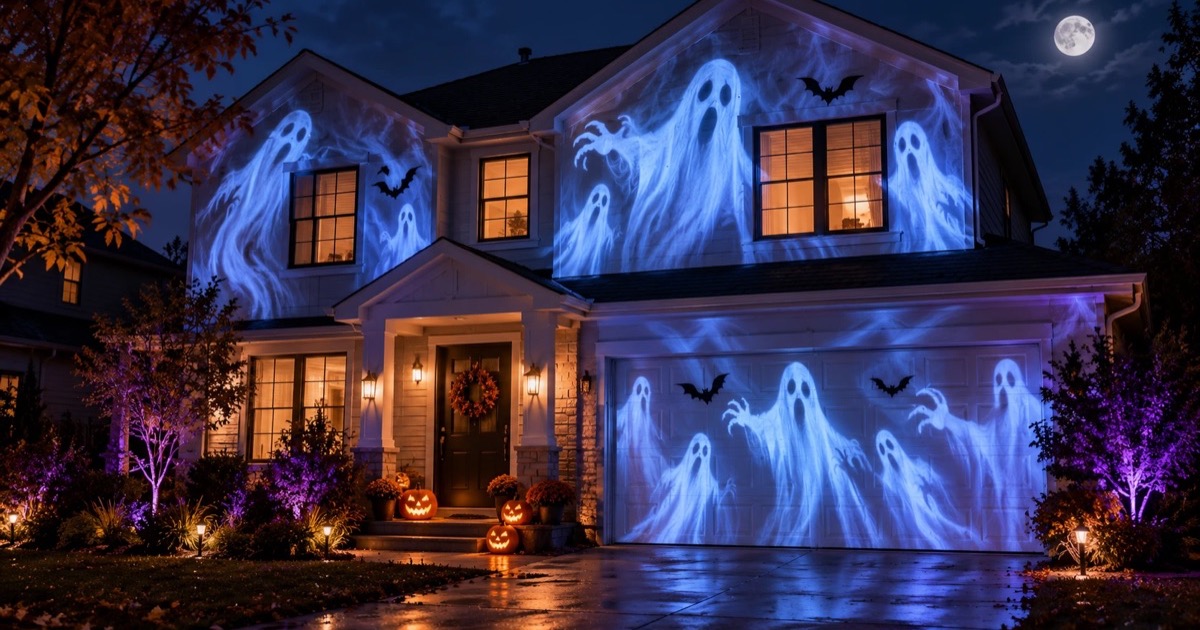
Most Halloween projector setups do not need paid content. A projector pointed at a sheer curtain or a garage door, playing a looping video, looks convincingly haunted at zero cost. The gap between the free sources and the commercial ones is smaller than the marketing suggests.
This page covers where to find free loops that are actually good, how to get them onto a projector, and where paid content earns its keep.
Free sources at a glance
| Source | Cost | Download? | Quality | Best for |
|---|---|---|---|---|
| YouTube | Free | No (stream or cast) | Varies; best channels are 1080p | Window loops, instant setup, no account needed |
| Internet Archive | Free | Yes (MP4) | SD to 720p | Offline USB playback, vintage haunt style |
| Pixabay | Free, no attribution | Yes (up to 4K) | HD and 4K available | Clean loops for mapping or custom setups |
| Vecteezy | Free with attribution | Yes (HD) | HD | Larger selection, requires credit |
| Lazy Lighting (built-in) | Free (in app) | No download needed | Generative, no resolution limit | House and indoor mapping with no external files |
| AtmosFX | $15–25 per pack | Yes (or USB) | 1080p | Purpose-built window silhouettes, polished characters |
YouTube: the fastest option
Search YouTube for "Halloween window projection loop" and you will find dozens of videos running one to four hours, designed to play unattended. The longest ones are intentional: they eliminate the obvious repeat that breaks the illusion.
Good search terms that reliably return quality results: "Halloween window silhouette loop", "Halloween projection effects 2 hours", and "spooky ghost projection loop 1080p". Several dedicated channels post new content each October.
To get the video onto a projector from a phone: AirPlay or Chromecast mirrors the screen directly. A USB-C to HDMI cable is the zero-latency wired option. One practical nuisance: YouTube ads interrupt the loop. Playing through the YouTube app on an Android TV projector or an Apple TV attached to the projector avoids some of that, since those can use YouTube's TV interface where ad timing differs.
Internet Archive: free downloads with offline playback
The Internet Archive hosts several Halloween projection collections at archive.org/details/FreeHalloweenFX and archive.org/details/Holidayprojectorvideos. These are MP4 files you download once and copy to a USB drive.
A USB drive plugged into a projector's USB port plays video directly — no phone, no streaming, no internet required. Most projectors support MP4 playback via USB; check your projector's manual for supported codecs. This is the setup to reach for when the location has no Wi-Fi or you need it to run without any device attached.
The Archive content skews toward the vintage style — practical-effect ghosts and demons rather than polished character animation. That reads as genuinely unsettling rather than cartoonish, which suits an exterior haunt better than something made for children.
Pixabay and Vecteezy: royalty-free loops
Pixabay offers Halloween and atmospheric video clips, including fog, fire and dark textures. Its Content License allows many free uses and adaptations without attribution, but prohibited uses and additional third-party rights still apply. Check the individual clip and the current license before using it in a public or commercial projection.
Vecteezy also offers Halloween video clips. Its Free License requires attribution and has limits on commercial use and production budgets. Paid licenses have different terms. Check the license attached to the clip and follow its attribution requirements.
Royalty-free does not mean unrestricted. Before downloading or adapting a loop for a mapping layout, confirm that its license covers your intended display and keep a record of the source and license.
- Pixabay Content License ↗ Allowed uses, prohibited uses and additional rights.
- Vecteezy License Agreement ↗ Attribution and usage limits for each license tier.
Lazy Lighting: built-in Halloween visuals, no files required
Lazy Lighting is a projection mapping app for iPhone, iPad, and Android. It comes with 45 built-in Halloween scenes, from jack-o'-lanterns to ghosts, bats, witches and skeletons, alongside its other visuals. You open the app, pick a Halloween scene, map it to your surface, and project — no USB prep and no file management. Each scene downloads inside the app the first time you use it.
The scenes are video loops, so they play continuously for as long as the display runs. Lazy Lighting is free to download, and the free plan lets you map surfaces and try three of the Halloween scenes, with a small watermark on the projector output.
Lazy Lighting Pro unlocks all 45 Halloween scenes and every other visual, removes the watermark, and adds project saving, audio reactivity so the visuals pulse with the music, MIDI and video export, with monthly, annual and lifetime plans.
Halloween projection mapping from your phone: the full setup guide →Four projection setups and what each needs
- Window silhouette (inside out). Project from inside the room onto a sheer curtain stretched across a window. Passers-by see the silhouette from outside. Keep the room dark: any light behind the curtain washes out the image. Seen from the street at night, a window-sized image doesn't need a big projector; a small portable one like the Nebula Capsule 3 Laser we use is enough. Use videos featuring dark backgrounds with bright or coloured subjects — the silhouette effect depends on back-projection contrast.
- Indoor scene. Project onto a wall, a foam tombstone, a hanging skeleton, or a draped sheet inside a room or entry hallway. This is where generative visuals — shifting green light, pulsing orange fire, crawling shadows — work as ambient atmosphere rather than a focal-point trick. Lazy Lighting's built-in Halloween scenes work here too: fill a dark corner with colour and motion without needing a specific surface shape. Indoors, a small portable projector is plenty.
- Wall or garage door (outside). Project from the yard onto a light-coloured wall or a large sheet hung flat. Outdoors is where projector brightness really matters: a small portable projector that is perfect for windows and indoor walls looks faint on a garage door, even at 9 pm. Plan on a much brighter projector, around 3,000 ANSI lumens, like the XGIMI Horizon 20 Pro we recommend for outdoor displays. Fog effect videos and animated face projections work well at this scale because they fill the surface.
- Mapped window or full house facade. ↗ A rectangular projection fills a wall. Mapping makes the video conform to an exact shape — a single window opening, a tombstone cutout, or the entire front of the house with every window treated separately. Lazy Lighting lets you assign visuals to mapped regions, including your own licensed video loops. Choose projector brightness and throw ratio for the actual image size, surface and ambient light; distance alone does not determine the brightness needed. Check the manufacturer's throw-distance specifications before buying. For example, XGIMI lists the Horizon 20 Pro at a 1.2–1.5:1 throw ratio: it is a standard-throw model, so it needs roughly 1.2 metres of distance for every metre of image width.
Full house Halloween projection mapping
Full house projection mapping — where video is warped to fit the architecture so windows glow, shutters ripple, and the wall appears to crack — is the highest-impact Halloween display a projector can produce. The effect is convincing because the image follows the building rather than sitting on top of it as a rectangle.
The hardware requirement is brightness. A whole house front needs a bright outdoor projector, around 4,000 ANSI lumens or more, to look saturated rather than washed out; brick, dark siding or a dusk start need more. Our pick is the XGIMI Horizon 20 Pro (4,100 ISO lumens, which is about the same as ANSI). It is a standard-throw projector that fills up to about 6.6 metres (300 inches) of width from around 8 metres back. That covers a garage and the windows around it; for a wider front, map the section people see from the street. The small portable projectors that are ideal for windows and indoor walls are not bright enough for a house front.
The software requirement is the mapping tool. Without one, a projector throws a rectangle. In Lazy Lighting you draw a shape over each window and panel, drag its corners until it lines up with the real surface, and assign a different visual to each. The app's 45 built-in Halloween scenes, from jack-o'-lanterns to ghosts, bats, witches and skeletons, can go in any region. The Pro tier unlocks audio reactivity, so the house pulses in time with music or ambient sound. Free loops from Pixabay or the Internet Archive work equally well inside each mapped region if you prefer external video files.
What visuals work at house scale: slow atmospheric loops — fog rolling, fire flicker, shifting green light — read better than fast character animation from the street. A 10-second fog loop that changes slowly has no obvious repeat at viewing distance.
Generate a Halloween video shaped to your own house with Lenscap ↗Projecting onto windows: fixing the overspill problem
The most common issue with window projection is overspill: the video bleeds onto the frame, siding, and curtains around the window, which kills the illusion. There are two ways to fix this.
The first is a black-border mask baked into the video file: add black padding around the video that matches the proportions of the window frame. This works if every window you're projecting is the same size and aspect ratio.
The second is software mapping. In Lazy Lighting, you trace the actual window shape — including any non-rectangular bay angles or trim — and the output conforms to it exactly. This is the practical option when windows vary in size, when the frame has unusual proportions, or when you're running multiple windows from one projector simultaneously. You can use any built-in Halloween scene or external video file inside each traced region.
Create window projection video with Lenscap ↗Making any video loop
YouTube's built-in loop: right-click (desktop) or long-press (mobile) the video and select "Loop". The video restarts silently when it ends.
For downloaded files on USB: most projector media players have a loop or repeat button in the playback controls. If yours does not, VLC on a phone or laptop (connected via HDMI) has loop in the playback menu, and on Apple TV the Infuse app loops any file reliably.
File format note: if a downloaded video will not play from USB, re-encode it to H.264 MP4 using HandBrake (free, Mac/Windows/Linux). That codec plays on virtually every projector USB port.
Lazy Lighting's built-in visuals and generative scenes loop automatically and indefinitely — there is no file to re-encode or repeat setting to find.
When paid content is worth it: AtmosFX
AtmosFX is the dominant paid source for pre-rendered Halloween projection videos. Packs run $15 to $25 each for digital download; USB drives cost more. What the paid content actually buys is character animation designed for rear-window projection: ghosts that move with perspective, zombie hands reaching through frames, jack-o-lanterns that interact with a human silhouette walking past. The compositing is done for you — the videos are pre-matted to work at window scale with a dark exterior.
Free content handles atmosphere well. AtmosFX handles character interaction well. Whether that gap is worth $20 depends on how much of your haunt depends on that one window.
Quick setup checklist
- 1
Pick a surface: sheer curtain (window silhouette), interior wall or object (indoor scene), flat exterior wall, or house facade (mapping).
- 2
Find your visual: Lazy Lighting built-in Halloween scenes for no-file setup; YouTube for instant streaming; Pixabay or Internet Archive for downloaded loops.
- 3
Connect the projector: a USB-C to HDMI cable, AirPlay from an iPhone, or Lazy Lighting Link on a Google TV projector. For YouTube alone, casting to a Chromecast also works.
- 4
Set the projector to rear projection mode if projecting through a curtain (flips the image).
- 5
If mapping to a window or facade: open Lazy Lighting, draw a shape over each window or panel, drag its corners until it lines up, and assign a built-in scene or external loop to each region.
- 6
Enable loop: automatic in Lazy Lighting; in YouTube use the loop option; in VLC use the playback menu; or use the projector's USB repeat setting.
- 7
Kill the lights: a dark room or yard makes any projector twice as effective.