Die beste professionelle VJ-Software 2026
VJ-Software für Live-Visuals im Vergleich: Resolume, MadMapper, VDMX und TouchDesigner – plus ein Set im Takt der Musik direkt vom Smartphone mit Lazy Lighting.
Von Lazy Lighting · Aktualisiert am
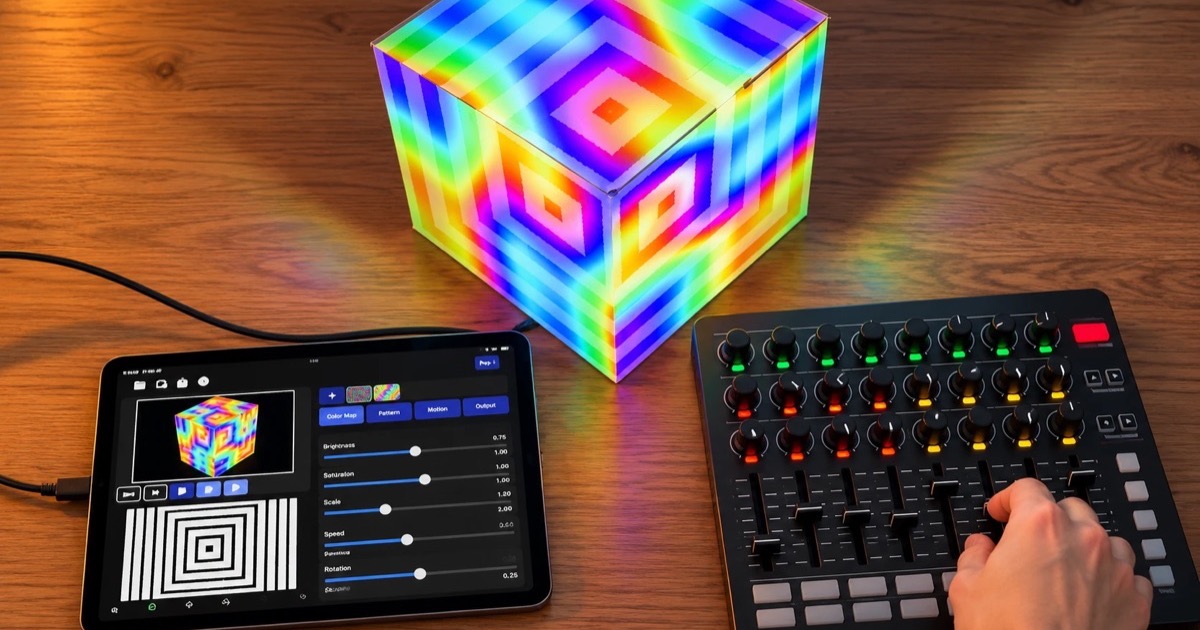
VJ-Software ist die Instrumentenseite von Live-Visuals: Clips starten, Ebenen mischen, zur Musik synchronisieren und in Echtzeit mit Effekten improvisieren. Projection Mapping kann dazugehören, aber die Kernkompetenz ist die Performance – und die Tools sind dafür gebaut, gespielt zu werden.
Hier sind die Programme, die 2026 zählen, vom Bühnenstandard bis zum Set für die Hosentasche. Transparenzhinweis: Wir entwickeln Lazy Lighting, den letzten Eintrag.

Mapping direkt vom Smartphone
Lazy Lighting macht dein Smartphone zum Projection-Mapping-Werkzeug für jeden Projektor, auf iPhone, iPad und Android.
Kostenloser Download · Pro optional
Auf einen Blick
Die Angaben zu den Mitbewerbern basieren auf der öffentlichen Dokumentation des jeweiligen Produkts zum Zeitpunkt der Erstellung; Editionen und Funktionen ändern sich, prüfe daher vor dem Kauf die aktuellen Versionen.
| Funktion | Lazy Lighting | MadMapper | Resolume | VDMX | TouchDesigner |
|---|---|---|---|---|---|
| Auf Mobilgeräten verfügbar | Ja | Nein | Nein | Nein | Nein |
| Plattformen | iOS, iPadOS, Android | macOS, Windows | macOS, Windows | macOS | macOS, Windows |
| Kostenlose Version | Ja | Testversion | Testversion | Testversion | Nicht-kommerziell |
| Integrierte Visual-Bibliothek | 190+ | Ja | Ja | Ja | Selbst bauen |
| BPM-Sync | Pro | Ja | Ja | Ja | Selbst bauen |
| Audioreaktiv | Pro | Ja | Ja | Ja | Selbst bauen |
| MIDI-Steuerung | Pro | Ja | Ja | Ja | Ja |
| Projection Mapping | Ja | Ja | Arena-Edition | Einfach | Selbst bauen |
| Edge Blending | Nein | Ja | Arena-Edition | Nein | Selbst bauen |
| Timeline | Ja | Ja | Nein | Nein | Selbst bauen |
| Szenen / Cues | Ja | Ja | Ja | Ja | Selbst bauen |
Resolume – der Branchenstandard
Resolume Avenue lernen die meisten aktiven VJs zuerst, und viele bleiben dabei: ein Clip-Raster, Ebenen mit Blend-Modi, Effektketten, zuverlässiger BPM-Sync und grundsolide Ausgabe. Arena, die größere Edition, ergänzt Projection Mapping, Edge Blending und DMX für Shows, bei denen die Visuals auf echte Bühnenbauten treffen.
Seine Stärke: Es ist ein Instrument. Alles lässt sich live spielen, auf MIDI-Controller legen und verhält sich auch unter Druck berechenbar. macOS und Windows, kostenpflichtige Lizenz pro Edition.
Mapping direkt vom Smartphone
Lazy Lighting macht dein Smartphone zum Projection-Mapping-Werkzeug für jeden Projektor, auf iPhone, iPad und Android.
Kostenloser Download · Pro optional
MadMapper – wenn die Bühne eine Fläche ist
MadMapper geht denselben Gig von der Mapping-Seite an. Während Resolume Mapping als Ausgabefunktion behandelt, versteht MadMapper Performance als etwas, das auf präzise gemappten Flächen stattfindet – Architektur, Bühnenbilder, LED-Geräte. Viele Produktionen nutzen beides: ein VJ-Tool liefert die Inhalte an MadMapper für die finale Geometrie. macOS und Windows, kostenpflichtige Lizenz.
VDMX und TouchDesigner – für Fortgeschrittene
- VDMX (macOS) ist der modulare Veteran: Bau dir deine eigene Performance-Oberfläche aus Panels, verknüpfe alles mit allem und werde so experimentell, wie der Gig es verlangt. Beliebt bei VJs, die ihr Rig als maßgeschneidertes Instrument verstehen.
- TouchDesigner (macOS/Windows) liegt eine Ebene unter der Kategorie: eine knotenbasierte Umgebung, um generative und interaktive Visuals von Grund auf zu bauen. Langsamer Einstieg, keine Grenzen nach oben, kostenlos für nicht-kommerzielle Nutzung.
Lazy Lighting – das Set für die Hosentasche
Lazy Lighting deckt den VJ-Kern ab – Visuals im Tempo, Live-Steuerung von Parametern, Audioreaktivität – auf iPhone, iPad oder Android, mit Projection Mapping, das fest eingebaut statt nachträglich drangeschraubt ist. Schließ einen MIDI-Controller an, und per MIDI Learn wird jeder Visual-Parameter zu einem Regler oder Pad – genau wie bei einem Desktop-Rig. Eine Bibliothek mit über 190 generativen Visuals, eigene Formen und eigene Szenen plus eine Timeline geben der Show ihre Struktur; das Audio im Raum oder ein festgelegtes BPM sorgt für die Synchronisation.
Ein Laptop-Rig auf der Hauptbühne eines Festivals ersetzt es nicht. Für Bar-Gigs, Hauspartys, Pop-ups und jede Show, bei der weniger Gepäck zählt, deckt es aber einen überraschend großen Teil dessen ab, was die Desktop-Tools können – und es ist der einzige Eintrag hier, der den Projektor direkt von dem Gerät aus bespielt, auf dem auch gemappt wird.
Sieh dir an, was die App kann →Welche VJ-Software passt zu dir?
- Das Standardinstrument für Live-Shows: Resolume Avenue – oder Arena, sobald Mapping und Blending ins Spiel kommen.
- Performance auf präzise gemappten Flächen: MadMapper.
- Ein individuell aufgebautes Performance-Rig: VDMX oder TouchDesigner.
- Gemappte Visuals im Takt der Musik ohne Laptop: Lazy Lighting.