AtmosFX alternatives: free and cheaper options, and when AtmosFX is worth it
What AtmosFX actually costs and includes, the free and cheaper alternatives worth trying for a Halloween window, and the cases where paying for AtmosFX is the right call.
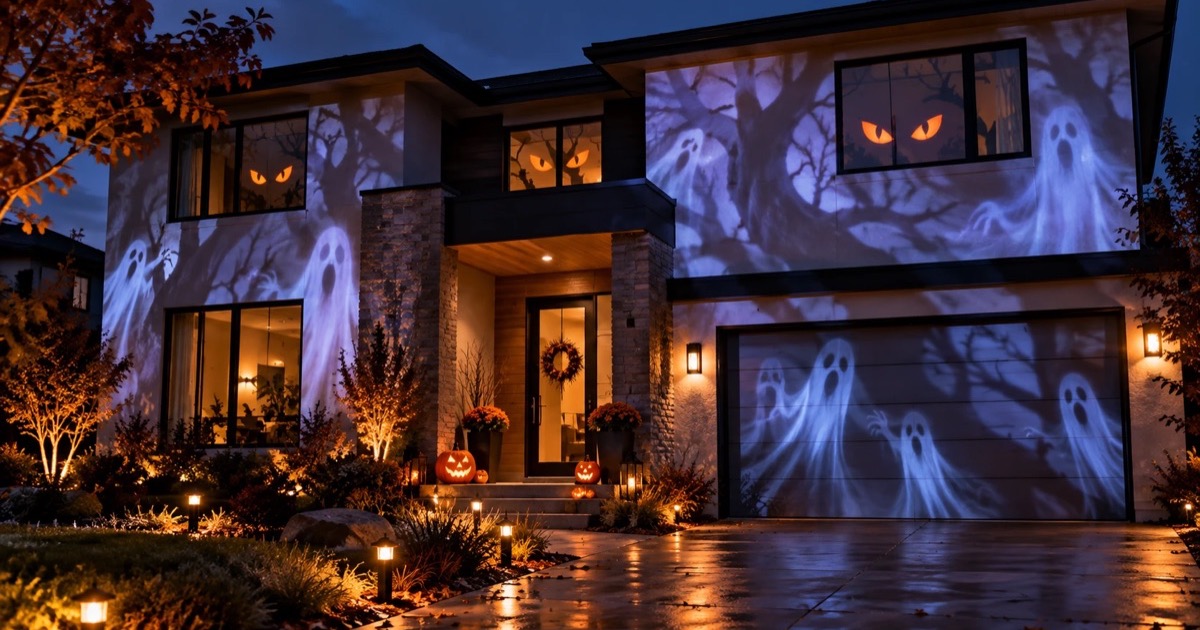
AtmosFX is the name most people find first when they look into Halloween window projections, and for good reason: its ghosts, zombies and jack-o'-lanterns are made specifically for windows and walls. It isn't cheap, though. As of October 2026, its Halloween collections cost $10 to $60 each at regular price, and buying a few different looks adds up quickly.
For a lot of displays, you don't need it. This guide covers what AtmosFX actually gives you, the free and cheaper alternatives worth trying, how to combine them, and when paying for AtmosFX is the right call. If you just want the full list of free video sources, that lives in a separate guide.
Free Halloween projector videos: where to get them and how to use them →
Map it from your phone
Lazy Lighting turns your phone into a projection mapping tool for any projector, on iPhone, iPad and Android.
Free to download · optional Pro
What you get with AtmosFX
AtmosFX sells "digital decorations": collections of short scenes, each made to look like it is happening inside your window or on your wall. Here is what a purchase includes, based on its product pages and help center.
- Files, not an app. Decorations are 1080p HD MP4 video files, delivered as zip downloads. There's no streaming service: you play the files from a USB stick, an SD card, a laptop, a media player or a phone. Popular collections are also sold on USB drives for about $40 to $45.
- Versions for every setup. Collections include horizontal and vertical versions, with modes for a TV, a wall, a window and Hollusion, a holographic-style effect projected onto AtmosFX's Hollusion screen material.
- Prices. Halloween collections cost $10 to $60. Some decorations are also sold on their own: the four scenes in Ghostly Apparitions are $14 each or $40 for the set, and each of the three decorations in Phantasms 2 is $25, or $60 for all three.
- Licensing. Businesses, and events that charge a fee, need AtmosFX's commercial license. Registered 501(c)(3) nonprofits can request one at no cost.
AtmosFX vs the alternatives
| Option | Cost | What you get | Best for |
|---|---|---|---|
| AtmosFX | $10–$60 per collection | 1080p MP4 downloads or USB drives; character scenes in horizontal and vertical versions | Character scares as the centerpiece |
| AtmosFX free sample | Free with email signup | One sample decoration | Trying the style before you buy |
| Free stock clips and YouTube | Free | Fog, fire, ghosts and hours-long loops; quality and licenses vary | Background atmosphere on no budget |
| Hallowindow | $2–$24 | Downloadable window animations, some in 4K | Cheap single effects |
| Lazy Lighting | Free to download; Pro unlocks all scenes | 45 built-in Halloween scenes fitted to your window from a phone, plus your own videos | Beginners, and several windows from one projector |
Free alternatives: stock clips and YouTube
Free Halloween loops are everywhere. YouTube has hours-long window projection videos, and sites like Pixabay and the Internet Archive offer clips you can download and play from a USB stick. For drifting fog, flickering fire, bats and glowing eyes, they hold up well from the street.
The trade-offs: YouTube has to keep streaming all evening, and ads interrupt the loop unless you have Premium. Downloaded stock clips are mostly atmosphere rather than characters made for a window, and every site has its own license terms. Our free video guide covers each source, with search terms and license notes.
Where to find free Halloween projector videos →A cheaper paid option: Hallowindow
Hallowindow sells its own Halloween window animations as downloads for a fraction of AtmosFX prices. Single effects such as spiders, ghosts and glowing eyes cost $2 to $4, several come in 4K, and the full collections are $18 to $24. The catalog is small and its newest titles date from 2021, but for one window on a tight budget it is the cheapest paid source we found.
Browse the Hallowindow shop ↗Map it from your phone
Lazy Lighting turns your phone into a projection mapping tool for any projector, on iPhone, iPad and Android.
Free to download · optional Pro
Lazy Lighting: the easiest way to get started
Disclosure: we make Lazy Lighting. It is the beginner-friendly option on this list: a projection mapping app for iPhone, iPad and Android with 45 Halloween scenes built in (jack-o'-lanterns, ghosts, bats, witches, skeletons and silhouettes), plus Christmas scenes for when the pumpkins come down. It works with any projector that has an HDMI input, connected by cable or wirelessly. There are no files to find, convert or copy to a USB stick: each scene downloads inside the app the first time you use it, then loops all night.
The difference from playing a plain video is the fit. You drag the corners of a shape on your phone until it lines up with the window, so the scene fills the glass and nothing spills onto the frame or the wall. Add more shapes for more windows, each with its own scene. A window takes a few minutes to set up; a whole house front takes under 30 minutes.
It also plays your own videos. Import an AtmosFX file you bought, or any H.264 MP4, and map it to a window's exact shape alongside built-in scenes in the other windows: paid characters where they matter, built-in scenes everywhere else.
Lazy Lighting is free to download. The free plan includes three of the Halloween scenes, with a small watermark on the projector output. Pro unlocks all 45, removes the watermark and adds project saving, audio-reactive visuals and video export, on a monthly, annual or lifetime plan. It is built for one projector at a time, so it won't replace a multi-projector rig at a ticketed haunt.
Connecting your phone to the projector →When AtmosFX is worth the money
AtmosFX earns its price when the projection is the main attraction rather than background. What you are paying for is performance: characters that appear, move and react in the window, and scares timed for people walking past. Each scene in the Ghostly Apparitions collection, for example, comes with roaming clips plus a startle scare. Free stock clips and generic loops don't do that.
- Characters are the point. If you want a ghost that looks like it is standing in your living room, or a zombie at the glass, AtmosFX is the strongest source we found.
- You have a tall or narrow frame. Vertical versions come with each collection, which suits doors and tall windows.
- You run a paid event. A single commercial license is simpler than checking the terms of every free clip.
Which should you pick?
- Just getting started: Lazy Lighting. Built-in scenes fitted to the window from your phone, with any HDMI projector.
- Spending nothing: the AtmosFX free sample, plus free stock clips or YouTube loops.
- A few dollars per effect: Hallowindow.
- Character scares as the centerpiece: AtmosFX, ideally one collection for the main window. Import it into Lazy Lighting if you want it fitted to the window's shape.
- Multi-projector haunt or paid event: AtmosFX with a commercial license, played from a laptop or media players.
How bright does the projector need to be?
Less than most guides suggest. For an inside-out window projection after dark, with the room dark, a small portable projector is enough; we use the Nebula Capsule 3 Laser, rated at 300 ANSI lumens. Go brighter, 1,000 ANSI lumens or more, if the window faces a bright street or you want to start at dusk.
Outdoor surfaces are a different story. A garage door needs around 3,000 ANSI lumens or more, and a whole house front 4,000 or more. Our outdoor pick is the XGIMI Horizon 20 Pro.
The projector, tripod and cables we recommend →Frequently asked questions
- Is AtmosFX worth it? For character scares that are the centerpiece of your display, yes. For background atmosphere, free clips or built-in app scenes look just as good from the street for far less.
- Is there a free alternative to AtmosFX? Yes. AtmosFX itself offers a free sample decoration when you join its email list, YouTube and free stock sites have plenty of Halloween loops, and Lazy Lighting includes three Halloween scenes on its free plan, with a small watermark on the projector output.
- Does AtmosFX have an app? AtmosFX sells its decorations as downloadable MP4 files and on USB drives rather than through a streaming app. Play them from a USB stick in the projector, a laptop, a media player, or a phone app like Lazy Lighting.
- Can I use AtmosFX videos with Lazy Lighting? Yes. Download and unzip the files on a computer, move the MP4 you want to your phone, then import it into the app and map it to your window. If a file won't import, re-encode it to H.264 with HandBrake, which is free.
- Does Lazy Lighting work without a projector? The app renders everything on your phone, so you can build and preview the whole display before you connect a projector. To show it on a window or wall, you need a projector.