Baixar

Escaneie com o celular para instalar

Christmas projector guide · 2026

Christmas projection mapping from your phone

Christmas projection mapping fits a moving scene to each window, door and wall of your house: snow in the windows, a light tree on the garage door, Santa's sleigh across the front. Set it up from your phone, with any projector.

Free to download · 4 Christmas scenes free · Pro optional

No projector yet? See which one you need ↓

By Jake Silverstein ·

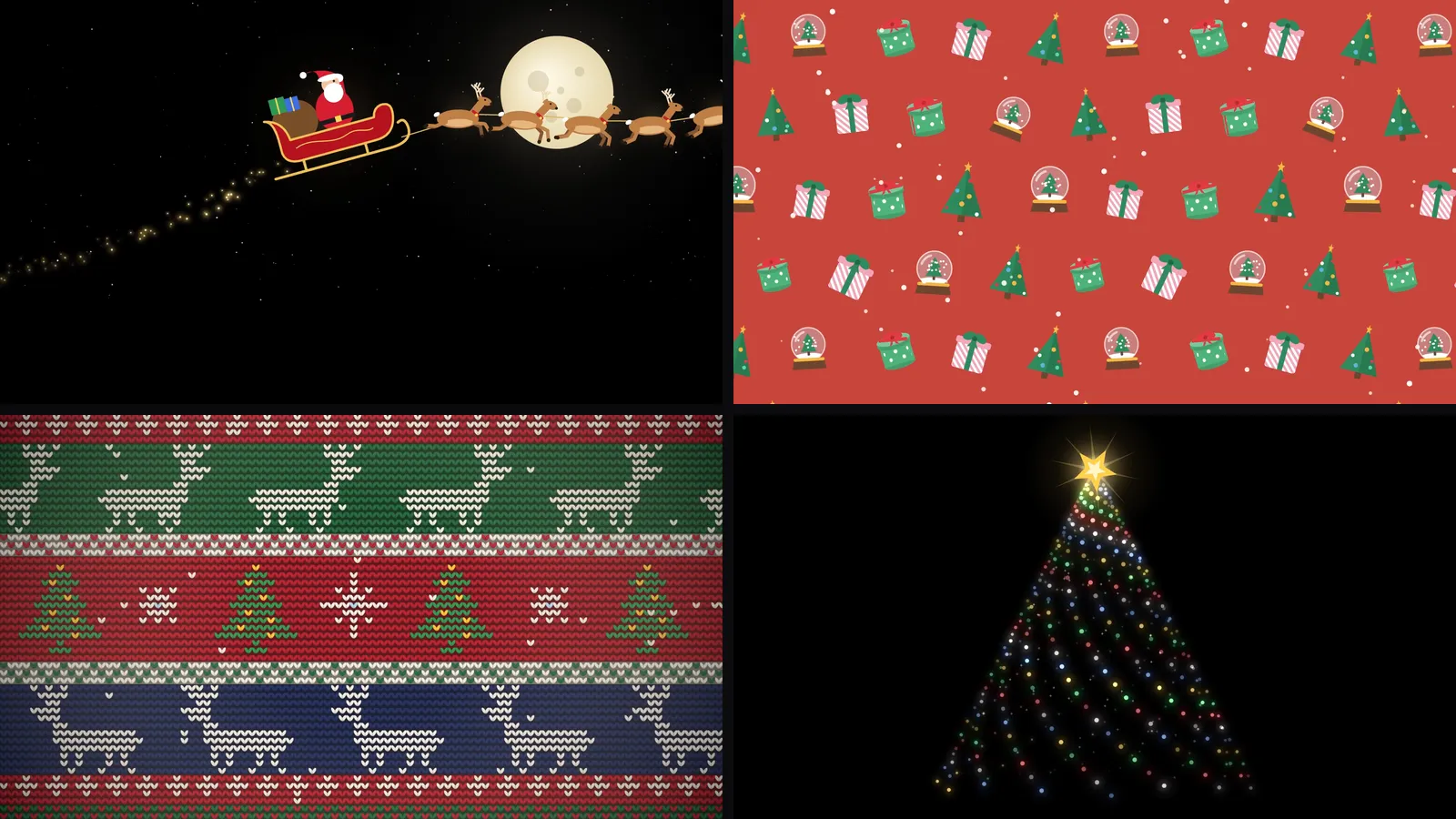
Four of Lazy Lighting's built-in Christmas scenes: Santa's sleigh crossing a full moon, a red wrapping-paper pattern of gifts, trees and snow globes, a knitted reindeer sweater pattern and a spiral light tree
Four of the 30 built-in Christmas scenes, as they play in the app.

One of the built-in scenes: Santa's sleigh

This is Santa's sleigh as it plays in Lazy Lighting: a sleigh and reindeer crossing a moonlit sky on a black background. It is one of the 30 Christmas scenes: four are on the free plan, and Pro unlocks the rest, including this one.

Scenes on black work especially well on windows and house fronts. Black areas project almost no light, so the sleigh seems to fly across the glass or the wall instead of sitting in a glowing rectangle.

What Lazy Lighting does for Christmas

  • Runs on iPhone, iPad and Android phones and tablets, with no laptop or desktop software.
  • Comes with 30 Christmas scenes: falling snow, Santa's sleigh, a twinkling light tree, a gingerbread parade, knitted-sweater patterns and wrapping-paper patterns of gifts, ornaments, bells and candy canes.
  • Fits each scene to the shape of a window, a door or a section of the house, not just a rectangle, and each shape plays its own scene.
  • Plays your own videos and photos too, including Christmas videos you have already bought.
  • Loops scenes until you stop them, so the display runs all evening.
  • With Pro, audio-reactive visuals move to the Christmas music you play.

Four ways to set up a Christmas projector

Pick the one that fits your house. The first two work indoors with a small projector; the last two are outdoor displays that need a much brighter one.

01 · Indoors, seen from outside

Snow and Santa in the window

Project from inside, seen from the street

Hang a white sheet, shower curtain or sheer white fabric tight across the inside of the window and project onto it from the room. People outside see falling snow, Santa's sleigh or a gingerbread parade in the window while the room behind stays hidden.

Map a shape to the window so the scene stays inside the frame; for an arched or odd-shaped window, trace it with an Outline shape. Keep the room dark, because any light behind the fabric washes out the image. A small projector is enough: 300 ANSI lumens after dark, or 1,000+ on a bright street or at dusk.

02 · Indoors

Fireplace, wall or a projected tree

A cosy display inside the house

Aim the projector at the chimney breast above the fireplace, a plain wall or the wall behind the tree, and darken the room. Add a shape for each area and give each its own scene: falling snow above the mantel, a knitted-sweater pattern on the chimney breast, or a Text shape that spells out Merry Christmas.

For a table or sideboard, stack a few plain white boxes and map each one with a Cube shape: the wrapping-paper patterns turn them into presents whose paper moves.

No room for a real tree? Map a tall shape to a door or a narrow strip of wall and play the twinkling light-tree scene. Projecting onto a real tree rarely reads well, because the dark needles swallow the light, so use the wall behind it instead.

A small projector handles a mantel or a patch of wall in a dark room. To fill a whole living-room wall, look for 500–1,000 ANSI lumens.

03 · Outdoors

Garage door

One big surface, projected from the driveway

Set the projector on a tripod in the yard or driveway and aim it at the garage door. Map one shape to the door and fill it with a big, slow scene: the light tree, falling snow or Santa's sleigh read well from across the street, where fast patterns turn to mush.

A garage door needs 3,000+ ANSI lumens after dark, roughly ten times what a window needs. The small projector we use indoors looks faint out here; our outdoor pick is the XGIMI Horizon 20 Pro.

04 · Outdoors

The whole house front

Every window, door and panel mapped on its own

This is where projection mapping leaves a light projector behind. Map each window, the front door and the wall panels as separate shapes and give each its own scene: snow in the windows, a sweater pattern on the door, gift patterns on the panels. The house looks decorated instead of wearing a rectangle of video.

Set up the projector across the yard or the street, draw a shape over each surface on your phone and drag the corners until they line up. Most house fronts take under 30 minutes.

This needs 4,000–5,000+ ANSI lumens. The XGIMI Horizon 20 Pro (4,100 ISO lumens) fills up to about 6.6 metres (22 feet) of width from around 8 metres (26 feet) back, enough for a garage and the windows around it. On a larger house, map the section people see from the street.

Which projector do you need?

It comes down to inside or outside. A window needs about 300 ANSI lumens after dark; a garage door needs 3,000 or more, and a whole house front 4,000 to 5,000 or more.

Indoors: windows, mantels and small walls

Nebula Capsule 3 Laser

The projector we use in our videos. At 300 ANSI lumens it is bright enough for a window seen from the street after dark, or a mantel in a dark room. Small and battery powered, with Google TV built in for wireless Lazy Lighting Link and a standard tripod thread.

View on Amazon ↗

Outdoors: garage doors and house fronts

XGIMI Horizon 20 Pro

Bright enough for outdoor displays after dark (4,100 ISO lumens), with Google TV built in. Its image tops out at about 6.6 m (22 ft) wide, so on a big house map the street-facing section. It runs on mains power, so plan an outdoor-rated extension cord.

View on Amazon ↗

Whichever you choose, put it on a tripod ↗ so the mapping stays lined up all season.

Get the app now, so your display is ready when the projector arrives.

Free to download · 4 Christmas scenes free · Pro optional

As an Amazon Associate we earn from qualifying purchases.

How to set it up in 5 steps

  1. 1

    Get Lazy Lighting. Download it from the App Store for iPhone and iPad, or Google Play for Android phones and tablets.

  2. 2

    Connect your phone to the projector. A USB-C or Lightning to HDMI cable is the most reliable. iPhone and iPad can also use AirPlay, Android phones can use screen mirroring where the phone supports it, and Android TV or Google TV projectors connect wirelessly with Lazy Lighting Link.

  3. 3

    Draw a shape on each surface. Add a Square, Circle, Outline or Text shape for each window, door or panel and drag its corners on your phone while you watch the projection line up. For an arched window, trace it with an Outline shape.

  4. 4

    Pick a Christmas scene. Choose one of the 30 built-in Christmas scenes for each shape, or import your own videos and photos.

  5. 5

    Lock it down and leave it running. Sandbag the tripod so nothing shifts, keep the phone plugged in, and on iPhone set Auto-Lock to Never so the phone doesn't sleep.

Connection guide: cables, AirPlay and Lazy Lighting Link →

Can I use a normal projector?

Yes. There is no special Christmas projector: any video projector with an HDMI input works, including the one you already own, a cheap mini projector or an old office projector. What matters is brightness for the surface (see the table below), not the label on the box.

The "Christmas projectors" sold in stores are mostly laser or snowflake light projectors. They spray the same moving dots or snowflakes over everything in front of them and can't fit a window, frame a door or play a scene like Santa's sleigh. Projection mapping uses a video projector and fits a separate animated scene to each window, door or section of the house.

Do you need a Christmas projector? Light projectors vs video projectors →

Christmas projector videos: built in, bought or your own

Lazy Lighting's 30 Christmas scenes cover falling snow, Santa's sleigh, a twinkling light tree, a gingerbread parade, candy-cane stripes, knitted Christmas-sweater patterns with reindeer, snowmen, penguins and Santa, and wrapping-paper patterns of gifts, ornaments, bells, wreaths and snowflakes. Four of them are on the free plan; Pro unlocks the rest.

If you have bought Christmas window videos elsewhere, for example from AtmosFX, import the file and map it like a built-in scene. Your own videos and photos work the same way. Free Christmas loops from stock-video sites work too; our free videos guide lists where to find them and how to play them.

Free Christmas projector videos: where to download them →

How bright does the projector need to be?

Brightness is the one thing you can't fix in the app. Rough guide, after dark:

SurfaceANSI lumens
Window, projected from inside onto fabric300+ (1,000+ on a bright street or at dusk)
Indoor wall in a dim room500–1,000
Garage door3,000+
Whole house front4,000–5,000+

How far away does the projector need to be?

Distance = throw ratio × picture width. Most home projectors, including both our picks, have a throw ratio of about 1.2, so the projector sits a little further back than the picture is wide. Check your projector's manual or spec sheet for its exact ratio; a short-throw model needs much less room.

What you're projecting onPicture widthDistance at a 1.2 throw ratio
Small window1 m (3 ft)About 1.2 m (4 ft)
Large window1.5 m (5 ft)About 1.8 m (6 ft)
Single garage door2.7 m (9 ft)About 3.3 m (11 ft)
Double garage door4.9 m (16 ft)About 5.9 m (19 ft)
House front section6.6 m (22 ft)About 8 m (26 ft)

What does a Christmas projection display cost?

The projector is the only real expense; your phone runs the show. A window or indoor display costs about $100–800: a compact projector (from about $70 for a mini LED model, a few hundred for a small laser one) plus a $15–50 HDMI adapter. A garage door or house front costs about $1,500–2,500, mostly for a projector with 4,000+ ANSI lumens, plus a stand or shelter and a long cable or wireless link. A used office projector can bring that down.

Lazy Lighting is free to download; the free plan includes four Christmas scenes with a small watermark, and Pro unlocks all 30.

Running a display outside in winter

Cold, damp nights are harder on a projector than on string lights. Most home projectors aren't sealed against rain, and many aren't rated to run below freezing, so check the operating temperature in your projector's manual before you plan a season outdoors.

  • Project from somewhere sheltered. A covered porch, an open garage, a shed or a car parked on the driveway keeps rain and frost off the projector. Projecting from inside through a window works too: put the lens close to the glass and turn off the lights behind it, because the glass costs a little brightness and reflects anything lit in the room.
  • If it has to sit outside, give it a roof, not a box. A plastic tub turned on its side, or a hood over the top, keeps rain off while leaving the vents open. Never seal a projector in a closed box: it needs airflow, and a closed box traps heat and moisture.
  • Watch for condensation. Bringing a cold projector into a warm house can fog the lens and leave moisture inside. Let it warm up in its case or a closed bag for about an hour before you switch it on. Outside, dew on the lens blurs the image; a small hood helps, and a microfibre cloth clears it.
  • Let the projector run the show, not your phone. Cold drains phone batteries, and a cable keeps your phone out by the projector. With Lazy Lighting Link on a Google TV or Android TV projector, your phone controls the show over Wi-Fi from indoors, and with Pro, Link Playback saves the show to the projector so you can put the phone away.
  • Use outdoor-rated cords and a GFCI outlet. Indoor cords aren't made for wet ground or freezing nights. Keep plugs and adapters off the ground, in a weatherproof cord box if you have one.
  • Check before you add a timer. A smart plug can switch the display off at night, but many projectors stay off when the power comes back. Look for a setting like auto power-on or direct power-on before you rely on a timer to switch it back on.
  • Think about the neighbours. Keep the light off their windows and out of drivers' eyes, and switch the display off at a reasonable hour.
Link Playback: play the show without your phone →

Want the kids to play on it, too?

Lazy Lighting is for decorating. If you'd like a party game on the same wall, where everyone plays from their phone, our sister app WishPane makes games for a projector or TV.

WishPane: party games for your wall ↗

Common questions about Christmas projection displays

How do I project Christmas lights onto my house?

Put a bright projector (4,000+ ANSI lumens) on a tripod across the yard, connect your phone, and draw a shape over each window, door and panel in Lazy Lighting. Give each shape a Christmas scene and leave it running. Most house fronts take under 30 minutes to map.

Can I use a normal projector for Christmas projection?

Yes. Any video projector with an HDMI input works, including one you already own. You don't need a special Christmas projector; you need enough brightness for the surface: about 300 ANSI lumens for a window after dark, 3,000+ for a garage door.

How far away does a Christmas projector need to be?

Multiply the picture width by the projector's throw ratio. At a typical 1.2 ratio, a 1 m (3 ft) window needs the projector about 1.2 m (4 ft) away, and a 2.7 m (9 ft) garage door about 3.3 m (11 ft) away.

How much does a Christmas projection display cost?

About $100–800 for a window or indoor display, mostly the projector and a $15–50 HDMI adapter. A garage door or house front costs about $1,500–2,500, mostly for a 4,000+ ANSI lumen projector. Lazy Lighting is free to download, with an optional Pro plan.

What projector do I need for a Christmas display?

For a window, about 300 ANSI lumens after dark is enough; we use the Nebula Capsule 3 Laser. A garage door needs 3,000+ and a house front 4,000–5,000+; our outdoor pick is the XGIMI Horizon 20 Pro, which fills up to about 6.6 m (22 ft) wide. Any projector with an HDMI input works with a cable.

Is Lazy Lighting free?

Lazy Lighting is free to download. The free plan lets you map surfaces and use about 20 visuals, including four of the Christmas scenes, with a small watermark on the projector output. Pro unlocks all 30 Christmas scenes, all 45 Halloween scenes and every other visual, and adds audio-reactive visuals, BPM sync, MIDI, video export up to 4K and project saving, with no watermark. Monthly, annual and lifetime plans are available.

Which Christmas scenes are included?

30 Christmas scenes: falling snow, Santa's sleigh, a twinkling light tree, a gingerbread parade, candy-cane stripes, knitted Christmas-sweater patterns and wrapping-paper patterns of gifts, ornaments, bells and snowflakes. You can also import your own videos and photos.

How do I connect my phone to the projector?

Use a USB-C or Lightning to HDMI cable, AirPlay from iPhone or iPad, screen mirroring on Android phones that support it, or Lazy Lighting Link on Android TV and Google TV projectors or a Chromecast with Google TV for a wireless connection. There is no Mac or Windows version.

How do I keep the projection inside the window frame?

Map a shape to the window. The scene plays only inside that shape and the rest of the projector image stays black. For arched or unusual windows, trace the opening with an Outline shape.

Can I leave a projector outside in winter?

Only if it's sheltered and rated for the cold. Most home projectors aren't weatherproof and many aren't rated below freezing, so put it under a porch roof, in a garage or shed, or behind a window, and never seal it in a closed box. If you bring it inside each night, let it warm up in its case for about an hour before switching it on, so condensation doesn't form inside.

Will it run all night?

Yes. Scenes loop until you stop them. Keep the phone plugged in and, on iPhone, set Auto-Lock to Never so the phone doesn't go to sleep.